Skip to content
HTTP Requests in Tauri
Hi, I'm Terence. This article looks at how to make HTTP requests in a Tauri application.
Introduction
Earlier articles in this series focused more on application structure and architecture. Here we move one level closer to actual application behavior by integrating HTTP support, which allows a desktop application to communicate with remote servers.
Install dependencies
Adding HTTP support in Tauri is actually simple.
You can use standard request libraries such as Axios, but adapter behavior can become tricky after packaging. For reliability, I recommend using Tauri's own HTTP API because it fits the runtime model directly.
One trade-off is that requests made through Tauri's Rust-backed HTTP layer are not visible in the browser-style WebView network console. Even so, it is the officially recommended approach and avoids a lot of subtle runtime issues.
bash
npm install -D @tauri-apps/apiUpdate configuration
After installing the dependency, you still need to allow outbound requests explicitly. In practice, you are telling Tauri which HTTP and HTTPS targets are allowed.
Example src-tauri/tauri.conf.json:
json
{
  "tauri": {
    "allowlist": {
      "http": {
        "all": true,
        "request": true,
        "scope": [
          "http://localhost/*",
          "http://jsonplaceholder.typicode.com/*"
        ]
      }
    }
  }
}
Build a simple request wrapper
The implementation idea is very similar to a normal frontend HTTP client: create a small wrapper class, then expose helpers on top of it.
src/http/client.ts
typescript
import { fetch, FetchOptions, Response } from "@tauri-apps/api/http";

interface RequestInterceptor {
  onRequest(config: FetchOptions): FetchOptions | Promise<FetchOptions>;
}

interface ResponseInterceptor {
  onResponse<T>(response: Response<T>): Response<T> | Promise<Response<T>>;
  onError(error: Error): void | Promise<void>;
}

class HttpClient {
  private baseURL: string = "";
  private requestInterceptors: RequestInterceptor[] = [];
  private responseInterceptors: ResponseInterceptor[] = [];

  private constructor() {}

  private static instance: HttpClient;

  static getInstance(): HttpClient {
    if (!HttpClient.instance) {
      HttpClient.instance = new HttpClient();
    }
    return HttpClient.instance;
  }

  setBaseURL(baseURL: string): void {
    this.baseURL = baseURL;
  }

  addRequestInterceptor(interceptor: RequestInterceptor): void {
    this.requestInterceptors.push(interceptor);
  }

  addResponseInterceptor(interceptor: ResponseInterceptor): void {
    this.responseInterceptors.push(interceptor);
  }

  private async executeRequestInterceptors(config: FetchOptions): Promise<FetchOptions> {
    for (const interceptor of this.requestInterceptors) {
      config = await interceptor.onRequest(config);
    }
    return config;
  }

  private async executeResponseInterceptors<T>(response: Response<T>): Promise<Response<T>> {
    for (const interceptor of this.responseInterceptors) {
      response = await interceptor.onResponse(response);
    }
    return response;
  }

  private async executeErrorInterceptors(error: Error): Promise<void> {
    for (const interceptor of this.responseInterceptors) {
      await interceptor.onError(error);
    }
  }

  async request<T>(url: string, options: FetchOptions): Promise<T> {
    const config = await this.executeRequestInterceptors(options);

    try {
      const response = await fetch<T>(this.baseURL + url, config);
      const processedResponse = await this.executeResponseInterceptors(response);
      return processedResponse.data;
    } catch (error) {
      await this.executeErrorInterceptors(error as Error);
      throw error;
    }
  }
}

const httpClient = HttpClient.getInstance();
export default httpClient;
Then expose a small public API:
src/http/index.ts
typescript
import httpClient from "./client";
import { FetchOptions, Response, ResponseType, Body } from "@tauri-apps/api/http";

httpClient.setBaseURL("http://jsonplaceholder.typicode.com");

httpClient.addRequestInterceptor({
  onRequest(config: FetchOptions): FetchOptions {
    config.headers = {
      ...config.headers,
    };
    return config;
  },
});

httpClient.addResponseInterceptor({
  onResponse<T>(response: Response<T>): Response<T> {
    if (!response.ok) {
      throw new Error(`HTTP error! status: ${response.status}`);
    }
    return response;
  },
  onError(error: Error): void {
    console.error("HTTP request error:", error);
    throw error;
  },
});

const get = async <T>(url: string) => {
  return httpClient.request<T>(url, {
    method: "GET",
    responseType: ResponseType.JSON,
  });
};

const post = async <T>(url: string, data: Record<string, unknown>) => {
  return httpClient.request<T>(url, {
    method: "POST",
    body: Body.json(data),
    responseType: ResponseType.JSON,
  });
};

export default {
  get,
  post,
};
The core ideas are the same as in ordinary frontend request encapsulation:
- set a base URL
- use interceptors
- expose simple
get/posthelpers
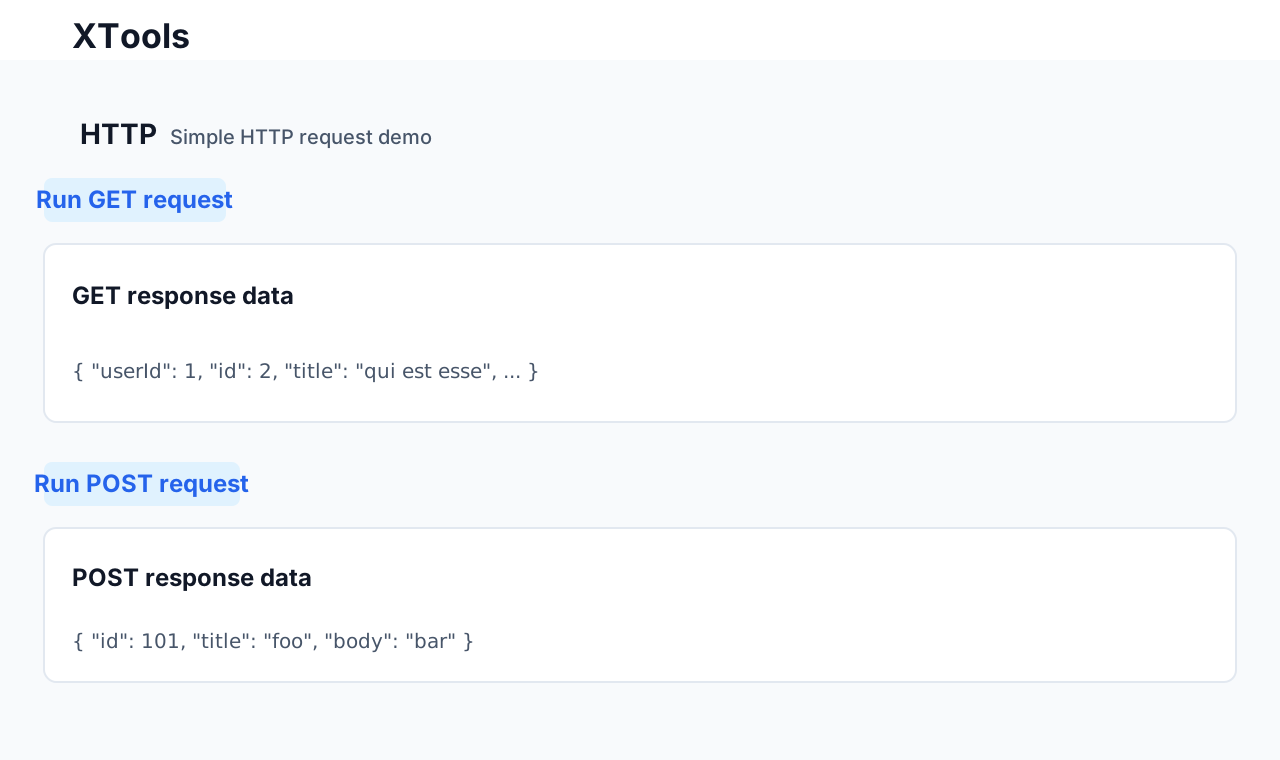
Use it in a page
tsx
import { useState } from "react";
import { Button, Card } from "@douyinfe/semi-ui";
import http from "@/http";

const Http = () => {
  const [getResponse, setGetResponse] = useState<string>("");
  const [postResponse, setPostResponse] = useState<string>("");

  const getFetchTest = () => {
    http.get("/posts/2").then((res) => {
      setGetResponse(JSON.stringify(res));
    });
  };

  const postFetchTest = () => {
    http
      .post("/posts", {
        id: 1,
        title: "foo",
        body: "bar",
      })
      .then((res) => {
        setPostResponse(JSON.stringify(res));
      });
  };

  return (
    <div>
      <Button onClick={getFetchTest}>Run GET request test</Button>
      <Card title="GET response data" style={{ marginTop: 10 }}>
        {getResponse}
      </Card>
      <div style={{ marginTop: 20 }}>
        <Button onClick={postFetchTest}>Run POST request test</Button>
        <Card title="POST response data" style={{ marginTop: 10 }}>
          {postResponse}
        </Card>
      </div>
    </div>
  );
};

export default Http;
At this point, HTTP support in Tauri is effectively in place.
Source code
https://github.com/Xutaotaotao/XTools/tree/feature-http
Closing
This article only implements the basic HTTP layer in Tauri, but once that piece is in place, the desktop application becomes far more capable. A desktop client with clean remote communication can do a lot more than a local-only tool.
If you are exploring Tauri and run into questions around HTTP, this is a good place to start.