Skip to content Configure the logger in
Building Logging in a Tauri App
Introduction
Logging is a critical part of any application. It helps with debugging, monitoring behavior, and understanding runtime issues. In this article, the focus is on configuring logging in a Tauri application and wiring it into both the Rust side and the JavaScript side.
Configure logging
First, add the log crate to the Rust project:
toml
[dependencies]
tauri = { version = "1", features = ["shell-open"] }
serde = { version = "1", features = ["derive"] }
serde_json = "1"
log = "0.4.21"
The log crate provides logging macros such as:
log::info!()log::error!()- and others
By itself, log only defines the logging interface. It still needs a logger implementation behind it.
Tauri has a community-maintained logging plugin that makes it much easier to collect logs from both Rust and JavaScript and send them to common log targets.
Install the Tauri logging plugin
Add this to Cargo.toml:
toml
[dependencies]
tauri = { version = "1", features = ["shell-open"] }
serde = { version = "1", features = ["derive"] }
serde_json = "1"
log = "0.4.21"
tauri-plugin-log = { git = "https://github.com/tauri-apps/plugins-workspace", branch = "v1" }
Then install the JavaScript package:
bash
pnpm add https://github.com/tauri-apps/tauri-plugin-log#v1
# or
npm add https://github.com/tauri-apps/tauri-plugin-log#v1
# or
yarn add https://github.com/tauri-apps/tauri-plugin-log#v1
Configure the logger in main.rs
rust
#![cfg_attr(not(debug_assertions), windows_subsystem = "windows")]

use tauri_plugin_log::LogTarget;

#[tauri::command]
fn greet(name: &str) -> String {
    format!("Hello, {}! You've been greeted from Rust!", name)
}

fn main() {
    tauri::Builder::default()
        .plugin(
            tauri_plugin_log::Builder::default()
                .targets([LogTarget::Stdout, LogTarget::Webview])
                .build()
        )
        .invoke_handler(tauri::generate_handler![greet])
        .run(tauri::generate_context!())
        .expect("error while running tauri application");
}
LogTarget controls where logs are written:
LogTarget::Stdout: terminal / consoleLogTarget::Webview: developer console in the Tauri windowLogTarget::LogDir: OS-specific log directory
The OS-specific log directory depends on the application identifier:
| OS | Format | Example |
|---|---|---|
| macOS | {homeDir}/Library/Logs/{bundleIdentifier} | /Users/Alice/Library/Logs/com.tauri.dev |
| Linux | {configDir}/{bundleIdentifier} | /home/alice/.config/com.tauri.dev |
| Windows | {configDir}/{bundleIdentifier} | C:\Users\Alice\AppData\Roaming\com.tauri.dev |
Writing logs
On the Rust side, replace plain console output with log::info!():
rust
fn change_menu_language(config: tauri::State<'_, Config>, lang: &str) {
    log::info!("change_menu_language: {}", lang);
    if let Err(e) = write_data_to_file(&config, lang) {
        eprintln!("Error writing file: {}", e);
    }
}
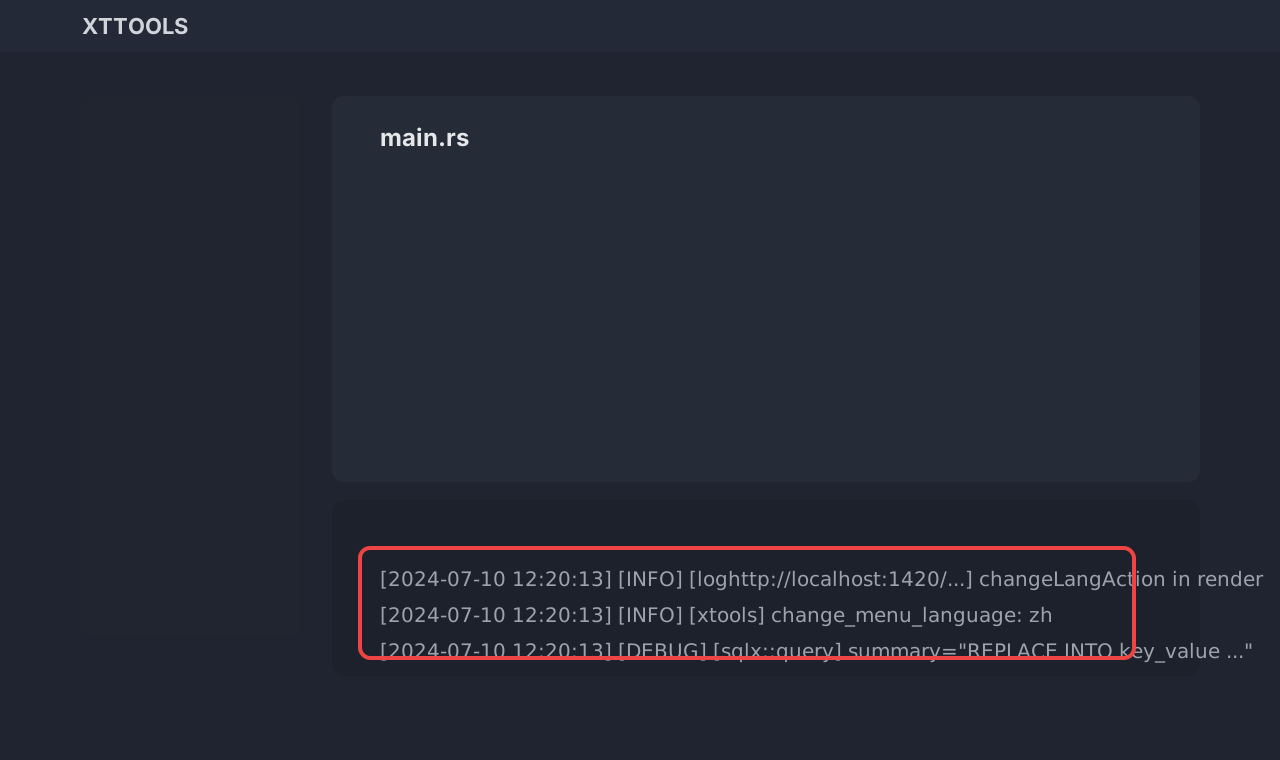
To see logs in the WebView console, call attachConsole() during frontend initialization:
typescript
import ReactDOM from "react-dom/client";
import { I18nextProvider } from "react-i18next";
import { attachConsole } from "tauri-plugin-log-api";
import i18n from "../src-tauri/locales/index";
import App from "./App";

attachConsole();

ReactDOM.createRoot(document.getElementById("root") as HTMLElement).render(
  <I18nextProvider i18n={i18n}>
    <App />
  </I18nextProvider>
);
Then use logging on the frontend like this:
typescript
import { info } from "tauri-plugin-log-api";

const changeLangAction = async (lang: string) => {
  info("changeLangAction in render");
  setStore("lang", lang);
  setCurrentLang(lang);
  i18n.changeLanguage(lang);
  if (IS_TAURI) {
    invoke("change_menu_language", { lang }).then(() => {
      relaunch();
    });
  }
};
Set the log level
If you log everything, especially trace-level output, the console becomes noisy. In most cases, it is better to keep only Info and above.
Add LevelFilter::Info:
rust
use log::LevelFilter;

.plugin(
    tauri_plugin_log::Builder::default()
        .targets([LogTarget::LogDir, LogTarget::Stdout, LogTarget::Webview])
        .level(LevelFilter::Info)
        .build()
)
After that, trace-level messages disappear.
One caveat: you may still see some trace logs very early in startup, before the logger plugin has finished initialization.
Closing
Logging in Tauri is straightforward and very worthwhile. By combining log with tauri-plugin-log, you can build a clean logging path that works across both Rust and JavaScript.
For client-side desktop development, consistent logging improves stability, debugging speed, and long-term maintainability.