Skip to content
What Is Tauri Like?
What Tauri is
Tauri is a framework for building small, fast binaries for all major desktop and mobile platforms. Developers can use any frontend stack that compiles to HTML, JavaScript, and CSS, while writing backend logic in languages such as Rust, Swift, or Kotlin when needed.
Official site: https://tauri.app
Tauri architecture
At a high level, Tauri can be thought of as three layers:
- tauri-app: integrates the modules, reads project configuration, and produces the final application package. It initializes communication between the web app and native system APIs, injects global APIs, manages updates, and more.
- WRY: a cross-platform WebView rendering library. It selects the appropriate browser engine on each platform and exposes a unified upper-layer API.
- TAO: a cross-platform window manager used to construct the main application window on each operating system.
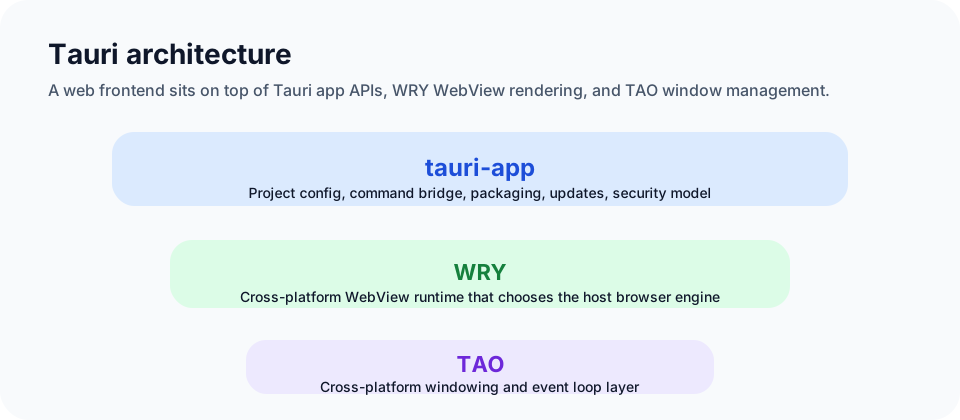
One of the biggest differences between Tauri and Electron is that Tauri does not bundle a dedicated Chromium runtime for every application. Instead, it uses the browser engine already provided by the operating system through WRY.
| Operating system | Browser engine | Notes |
|---|---|---|
| macOS | WebKit | Built into the system and usually the smoothest platform |
| Linux | WebKitGTK | GTK + WebKit |
| Windows | WebView2 | Uses the Edge Chromium engine |
Reference: https://tauri.app/v1/references/architecture/
What Tauri can be used for
Because of its performance and security characteristics, Tauri can be used to build many kinds of applications, including:
- local productivity tools such as IDEs, editors, and file managers
- media applications such as music players and video players
- games and entertainment tools such as small games and ebook readers
- office and productivity applications such as word processors, spreadsheets, and task tools
- system tools such as monitors, backup tools, and cleanup utilities
Comparing cross-platform desktop frameworks
Here the comparison focuses only on cross-platform desktop frameworks. Native desktop frameworks are in a different category and are not directly comparable in the same way.
The common choices include:
- Tauri
- Electron
- Flutter
- React Native
- Qt
The comparison dimensions below are performance, UI, native integration, ecosystem, real-world adoption, developer experience, and development challenges.
Performance
- Tauri: lightweight and WebView-based, with very low resource usage. It is usually much more efficient than Chromium-based Electron.
- Electron: bundles a full Chromium rendering process, so memory and CPU usage are typically much higher.
- Flutter: excellent performance, with strong rendering smoothness and fast startup through AOT/JIT compilation strategies.
- React Native: generally reasonable, but desktop scenarios may still need optimization work.
- Qt: close-to-native performance and a strong fit for resource-intensive applications.
User interface
- Tauri: frontend UI is built with web technology, but backend code can still work closely with the native system.
- Electron: also web-technology-driven, with strong browser rendering support.
- Flutter: provides its own design language and widget system for consistent cross-platform UI.
- React Native: uses a React-like component model and supports smooth animation, but native-level polish may require extra work.
- Qt: offers a very strong near-native UI experience with a large set of controls and animation capabilities.
Native integration
- Tauri: benefits from Rust's system-level strengths and can access native APIs and hardware resources directly.
- Electron: can integrate with native APIs through Node.js native modules and supporting libraries.
- Flutter: supports native integration through platform channels.
- React Native: supports native APIs through its bridging model.
- Qt: as a native framework, it can use platform capabilities very deeply.
Ecosystem
- Tauri: newer, but the community is active and growing quickly.
- Electron: mature ecosystem backed by the Node.js and Chromium worlds.
- React Native: large ecosystem and lots of documentation.
- Flutter: strong momentum with rich plugins and learning resources.
- Qt: mature docs, training resources, and a long history of use.
Example products
- Tauri: newer, but already used by projects such as Blink Shell and Lyo IM. See: https://github.com/tauri-apps/awesome-tauri
- Electron: used by products like VS Code, Slack, and WhatsApp. See: https://www.electronjs.org/apps
- React Native: used by products like Facebook, Instagram, and Uber Eats
- Flutter: used by multiple Google products
- Qt: widely used across multimedia, industrial control, reading software, and more
Developer experience
- Tauri: frontend with web frameworks, backend with Rust, connected through IPC
- Electron: frontend with HTML/JS/CSS, backend with Node.js
- React Native: JSX-based and conceptually close to React web
- Flutter: Dart-based, with a declarative UI model
- Qt: built with C++ or QML, supported by a complete toolchain
Development challenges
- Tauri: the community and plugin ecosystem are still younger than the most mature alternatives
- Electron: performance, memory, and package-size optimization are common concerns
- React Native: native dependency management and cross-platform high performance can be challenging
- Flutter: highly custom designs and OS-specific consistency can take extra work
- Qt: steeper learning curve and deeper system integration complexity
Overall comparison
The scores below are subjective reference scores out of 10:
| Framework | Performance | UI | Native integration | Ecosystem | Example adoption | Developer experience | Development challenge |
|---|---|---|---|---|---|---|---|
| Tauri | 9 | 8 | 9 | 7 | 7 | 8 | 7 |
| Electron | 5 | 8 | 6 | 9 | 9 | 9 | 8 |
| React Native | 6 | 7 | 7 | 9 | 9 | 8 | 7 |
| Flutter | 8 | 8 | 7 | 8 | 7 | 7 | 7 |
| Qt | 9 | 9 | 10 | 6 | 8 | 6 | 5 |
Summary
Tauri is a modern desktop framework built around a distinct three-layer architecture that combines a web frontend with a Rust backend. Compared with older desktop frameworks, Tauri offers:
- much smaller binaries
- lower CPU and memory usage
- better default security through a stricter sandbox model
- strong integration with operating system APIs
Because of that, Tauri provides a compelling way to build desktop applications with web technologies while keeping performance and system-level capabilities in view. As the ecosystem keeps growing, it is likely to become an even more practical choice for more developers and more product types.