Skip to content
Thoughts After One or Two Years of Building Electron Desktop Apps
Hi, I'm Terence. In this article, I want to talk about the one or two years I spent building Electron desktop applications and share some of the experience and perspective that came out of that work.
Introduction
I have been at my current company for about three years. When I first joined, most of my work was around moderately complex admin systems and a few lighter consumer-side SDK projects.
The Electron work started because I was in the security department. We urgently needed a desktop control application for monitoring device security and access control inside the company. In simple terms, it was a zero-trust desktop product.
There had already been an older security control tool in the company, but Windows and macOS were built separately, and the maintenance cost was high. Windows used C#, macOS used Objective-C, and both development and release efficiency were poor. With approval from engineering leadership, another colleague and I started exploring whether Electron could be used to build a unified desktop product.
We kicked off that project around the end of 2021. The Windows version launched during the Shanghai lockdown period, around April 2022. After that, due to a business reorganization, I was temporarily moved to another team to work on a consumer-facing startup-style project. When that ended, I returned to Electron-related work and have continued on it since then. That is why I call it "one or two years" rather than a perfectly clean timeline.
Thoughts on desktop development
If you are a frontend engineer, adding desktop development to your skill set is not a bad thing at all. It becomes a real strength. You can move in more than one direction, and desktop work often has deeper architectural challenges than people expect.
The architecture of a mature desktop product can become extremely complex, not really less interesting than backend work. Chromium itself is a good reminder of that. Of course, how deep the work goes depends on the product scenario. If you are only building something that behaves like a lightly wrapped webpage, then the technical depth may be limited. But once the work touches operating-system-level behavior, it absolutely becomes a differentiator.
Some people say desktop development narrows your path. My own view is different. Depth and breadth are not opposites. For engineers, learning more across domains is valuable, and later becoming an expert in one specific area usually still requires broad exposure first.
That is why I think frontend engineers having the chance to work on desktop products is a good thing:
- it expands skills
- it pushes you closer to system-level understanding
- it helps you think in a more complete product way
At this stage, because of business needs, I have already started reading Chromium source code. That alone says something about how deep the path can go.
Of course, these are just my own views.
Thoughts on Electron itself
I actually knew about Electron in my first two years of work. I built some small demos and even shared the technology with my team. But at that time, my understanding was still shallow. It was mostly just: "Frontend can build desktop apps now? That is pretty cool."
Only when I had to use it for a real enterprise desktop application did I properly research it. That is when I realized how powerful it really is. In many cases, it can satisfy almost any desktop requirement you are likely to run into.
There are already countless comparisons online between Electron and other frameworks. Whether it is good or bad depends entirely on the product scenario and the team behind it.
My own summary:
Cases where Electron is a strong choice
- when development efficiency matters a lot
- when you want to reduce manpower and maintenance cost
- when the team is frontend-heavy
- when the product has a large amount of GUI interaction
Cases where Electron is less suitable
- when package size is under strict constraints
- when the application is very performance-sensitive
- when the product is heavily multi-window and that complexity is central
For us, efficiency was critical, and we needed Windows and macOS to move forward together. So after comparison, we chose Electron. And honestly, the existence of VS Code gave us a lot of confidence.
The usual rule still applies: it depends on your own situation.
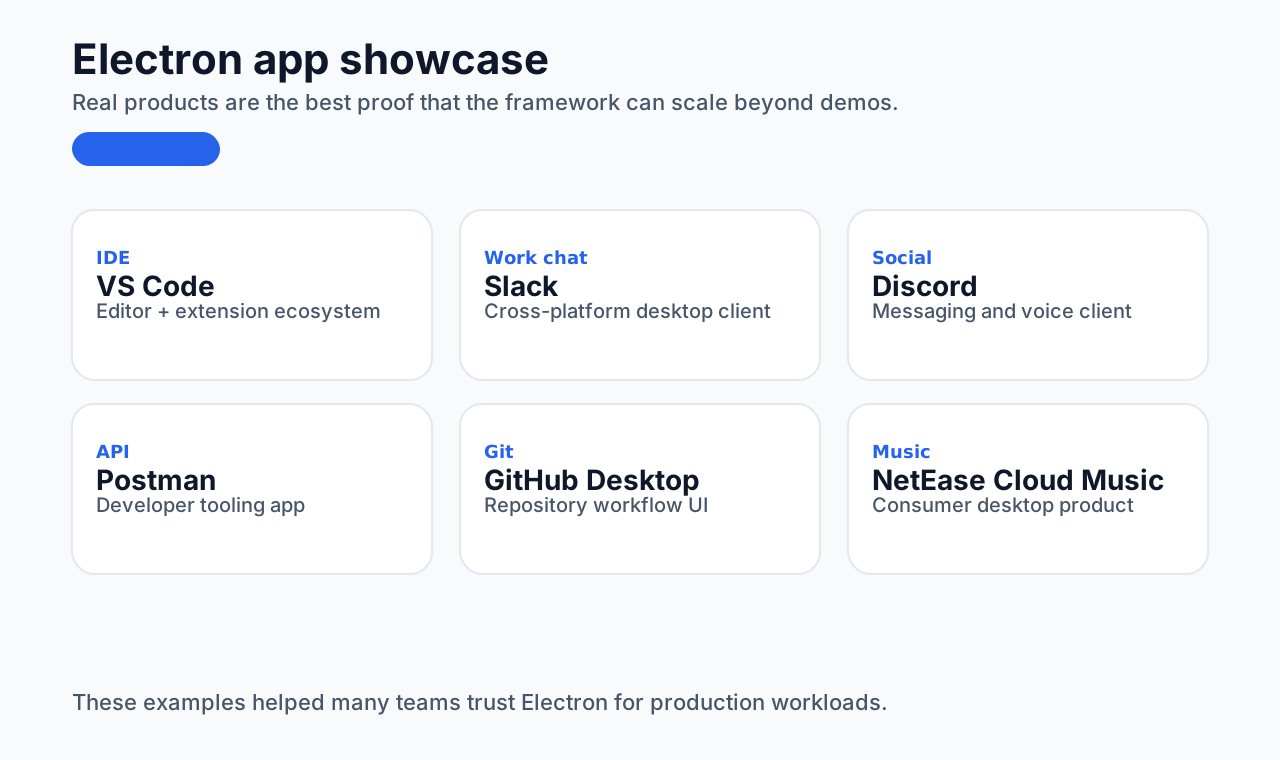 Image source: https://www.electronjs.org/apps
Overall technical architecture
I drew a high-level architecture diagram for the Electron product I worked on:
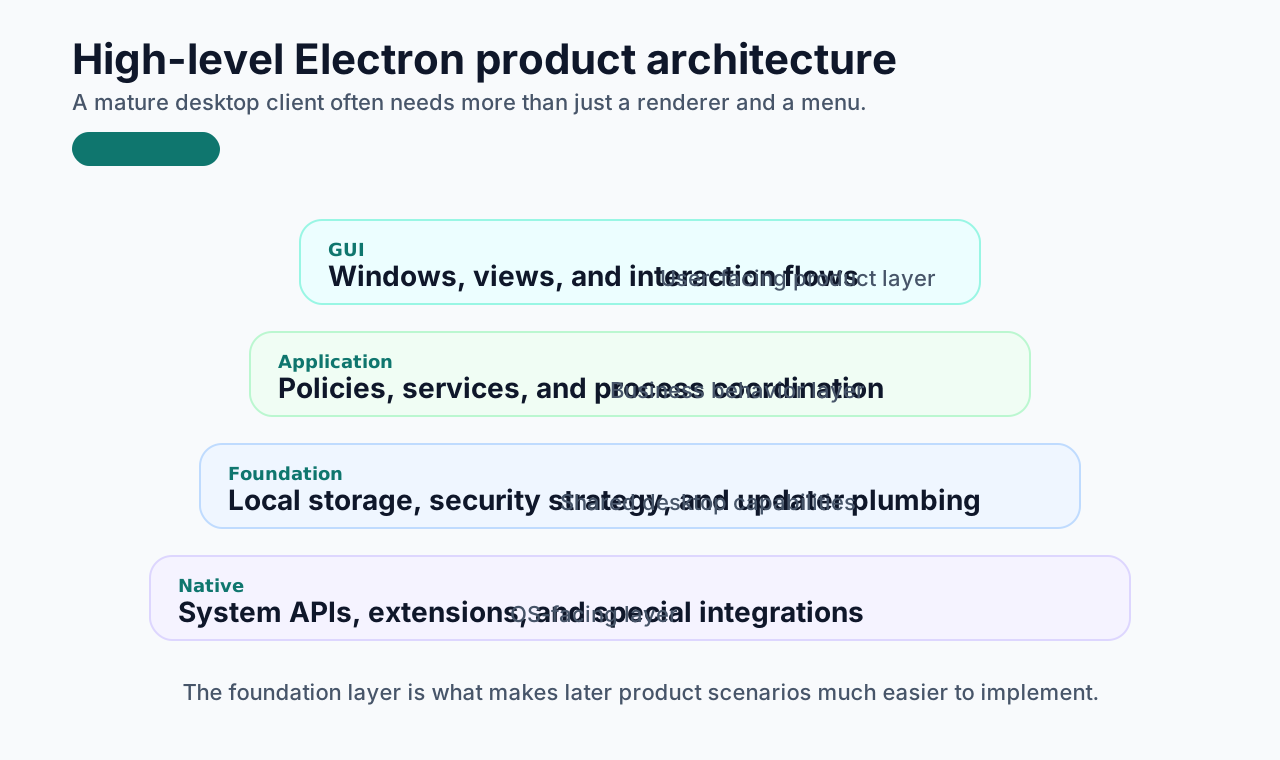
The project is built on Vite. Around that, we added security strategy infrastructure, local storage mechanisms, and an external plugin. That plugin is a WebView helper built with Tauri. I explain later why that was needed.
The application architecture was split into three large layers. The lower part focused on building foundational capabilities, layering the system, and adding native extensions. The upper part handled application management and GUI-related features.
With a stable overall foundation in place, implementing later business scenarios became much easier. That is a slight exaggeration, because some details were still very painful, but the point stands: the right foundation changes the pace of everything that follows.
Of course, this is only a high-level diagram. Many detailed technical flows and business scenario diagrams are not shown here, but I will mention a few of the more representative solutions below.
Challenges and solutions
Desktop development brings its own category of challenges, and most of them come from unusual business requirements. Frameworks solve some common application scenarios, but not everything. The same is true of web and mobile products too. The difference is that desktop work tends to pull you into more operating-system-specific problems.
The solutions below may not fit your own project. I am just recording what I actually encountered.
Software updates
Desktop software updates are one of the most important parts of product engineering. Any serious commercial product needs a stable and usable upgrade system.
The overall idea is not so different from how consumer apps think about updates. Even if the product is only used internally in a company, your users are still users, and the upgrade experience still matters.
The most important requirement for us was targeted rollout.
That capability is critical because it lets you:
- roll out gradually
- recall changes if needed
- monitor performance
- alert on failures
Once targeted rollout exists, every later feature becomes safer to ship.
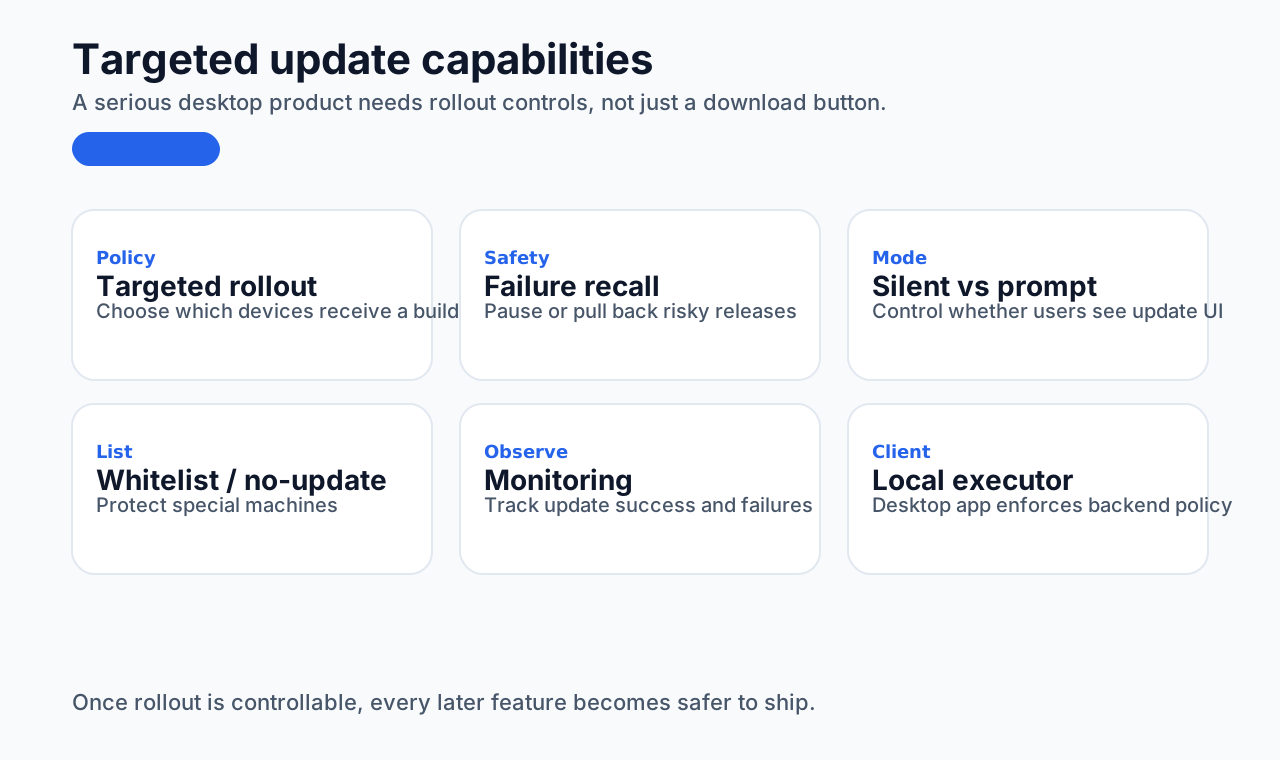
The update system was split into two parts:
- backend management
- desktop client
The backend handled policy configuration:
- which devices receive targeted updates
- which devices auto-update
- which devices are on a no-update whitelist
- whether the client should prompt the user or update silently
The client fetched those policies and executed the corresponding update behavior.
Our product had one extra complication: it was designed to stay alive for long periods. On macOS, once certain files are locked, they cannot be removed during the normal update process. So although download handling could use electron-updater hooks, installation could not simply use the default installation path.
In the end, we studied Electron's update implementation and wrote our own update script for the installation phase. Electron itself also registers a keep-alive update task, but that conflicted with our own keep-alive and file-lock requirements. So we had to disable part of that default behavior and take control ourselves.
This area took a lot of time to understand well. Windows was comparatively easier. macOS was harder because of the interaction between file lifecycle, keep-alive behavior, and the update path.
Task queue design
The task system was another important part of our product because the desktop client had to run many scheduled tasks.
Early in the product, the number of scheduled jobs was small. But after enough iteration, the number of tasks grew, their trigger conditions grew more varied, and concurrency started to matter. Eventually we redesigned the entire task system.
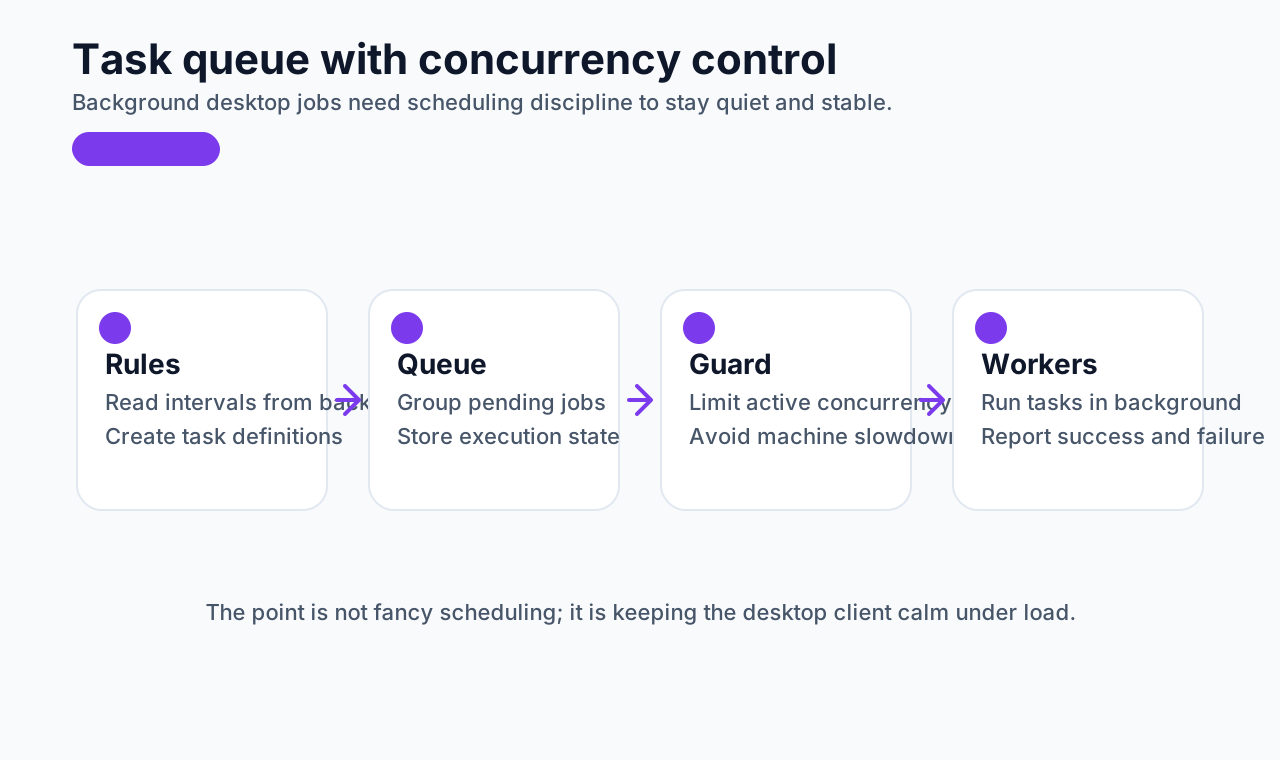
There are already strong scheduling libraries in the ecosystem, such as:
node-schedulenode-croncron
But in our case, one problem remained: concurrency control.
Many tasks had configurable intervals coming from the backend. If the client did not limit concurrency, several heavy tasks could fire at the same time and make the machine feel slow.
For example:
- 4 tasks running every 10 minutes
- 2 tasks running every 5 minutes
At some points, all 6 might overlap. If they are all CPU-heavy, users will feel the system stutter.
Security software should often stay quiet and stable in the background. It should not overload the device. So we built our own queue-based task model with concurrency control.
The underlying logic was not especially mysterious. It was basically a controlled setInterval loop plus task creation, destruction, queue reads, and controlled execution. But that scheduling layer made a huge difference to product stability.
Performance optimization
There are many articles about Electron performance optimization already. Here I will just share the direction that mattered most in practice.
The first question is: what are you trying to optimize?
You cannot optimize what you have not observed. So the most important step is finding the actual performance issue first.
Two tools I strongly recommend:
- Chrome DevTools, for renderer process analysis
- Electron Inspector, for main process analysis
References:
- https://developer.chrome.com/docs/devtools/overview
- https://www.electronjs.org/docs/latest/tutorial/debugging-main-process
Once you have the tools, the next step is learning to read the data. The most important area for me was memory analysis, because memory data helps expose:
- CPU-heavy behavior
- memory leak risks before release
My rough workflow:
- use Performance to locate the broad problem area
- use Memory for deeper analysis
- inspect heap snapshots
- identify the suspicious code path
- debug and repeat
That process works for both main and renderer processes.
I also want to call out a few common places where Electron apps leak memory or run into stability problems. These are all issues I learned the hard way.
Child processes not destroyed properly
If a child process is not terminated after its work is done, it keeps consuming resources.
javascript
const { spawn } = require("child_process");
const child = spawn("someCommand");

child.on("exit", () => {
  console.log("Child process exited");
});
If you do not ensure the process actually exits, memory and system resources will continue to be consumed.
Long-running HTTP requests without timeout handling
If HTTP requests hang indefinitely, they can retain memory and system resources much longer than expected.
javascript
const fetch = require("node-fetch");

fetch("https://example.com/long-request")
  .then((response) => response.json())
  .catch((error) => console.error("Error:", error));

const controller = new AbortController();
const timeout = setTimeout(() => {
  controller.abort();
}, 5000);

fetch("https://example.com/long-request", { signal: controller.signal })
  .then((response) => response.json())
  .catch((error) => console.error("Error:", error));
Event handlers not removed
Unused event listeners will continue holding references and increase memory pressure.
javascript
const handleEvent = () => {
  console.log("Event triggered");
};

window.addEventListener("resize", handleEvent);

window.removeEventListener("resize", handleEvent);
Timers not cleared
Forgotten setInterval calls are a very common source of unnecessary background work.
javascript
const intervalId = setInterval(() => {
  console.log("Interval task running");
}, 1000);

clearInterval(intervalId);
JavaScript objects held too long
Large objects kept alive through global references or closures can quietly hold a lot of memory.
javascript
let bigArray = new Array(1000000).fill("data");

bigArray = null;
Window instances not released
If old BrowserWindow instances are not cleaned up properly, they continue consuming memory.
javascript
const { BrowserWindow } = require("electron");
let win = new BrowserWindow({ width: 800, height: 600 });

win.on("closed", () => {
  win = null;
});
Large file or data handling
If large files are loaded all at once rather than streamed, memory pressure rises quickly.
javascript
const fs = require("fs");

fs.readFile("largeFile.txt", (err, data) => {
  if (err) throw err;
  console.log(data);
});

const readStream = fs.createReadStream("largeFile.txt");
readStream.on("data", (chunk) => {
  console.log(chunk);
});
A few special requirements
This product also came with some genuinely awkward requirements.
Keep-alive and file locks
As a frontend engineer, things like keep-alive services and file-lock handling are not usually topics you touch beforehand. Implementing them forced me to study a bunch of industry approaches.
The functionality itself was manageable. The difficult part was the side effects:
- custom pre-build and post-build scripts
- inability to input Chinese under macOS root mode
That is one reason we ended up building the Tauri-based WebView helper mentioned earlier.
Silent application installation
This one was especially intense.
In ordinary frontend work, you probably never need to build:
- a downloader
- an installer
- dual-platform compatibility
- support for
exe,zip,dmg,pkg - retry logic
- resumable downloads
- queue-based downloads
When I first received this requirement, it felt overwhelming. But after the technical plan became clearer, it was still just another large engineering problem. Even complex requirements become tractable once the structure is understood clearly.
VPN and access-record monitoring
For a frontend engineer, this can feel even further away from familiar ground.
Fortunately, we had an older VPN implementation to reference. Some parts could be translated from older code. A lot could be handled through command-line tools.
Access-record monitoring on the client side was harder. Without third-party open-source help, implementing it alone would be very difficult. That is the kind of problem where you end up reading a lot of GitHub and Stack Overflow.
Process blocking
Blocking unauthorized processes is very common in security software. It must be:
- real-time
- efficient
- accurate
You cannot noticeably harm the user's experience, but you still need to kill the right process quickly.
We went through several rounds of optimization here. Eventually it still felt like task-queue-based polling had real performance limits. The next possible directions were:
- global hooks
- locking the relevant process files directly
- changing file permissions
These are only a few examples. There were many other strange requirements too. They kept pushing my boundaries and forcing me to learn things I would never have touched otherwise.
Sometimes the only reaction is: wow, you can really do that this way too.
Closing
Without realizing it, this article has already gone on for a while. Looking back, the one or two years of building Electron desktop products did help me grow a lot, not only technically, but also in product design thinking.
At the same time, there are still bottlenecks. Doing the same kind of product for a long time can make further innovation harder, and the sense of novelty becomes smaller.
Security-oriented desktop software is also a very niche part of the overall software world. It has its own value and its own constraints. It needs to run quietly, run stably, be observable when something goes wrong, and remind the user only when it must.
From a frontend perspective, desktop experience still matters a lot:
- fluency
- visual quality
- low disturbance
That is still one of the goals we care about most: keep improving user experience.
The road is long. Frontend development really does have a broad and deep future. Whether it is desktop, backend, mobile, or the web, the ceiling can be much higher than people assume.
In the end, I hope everyone gets the chance to go deeper in their own field and eventually touch the ceiling they are aiming for.