Skip to content 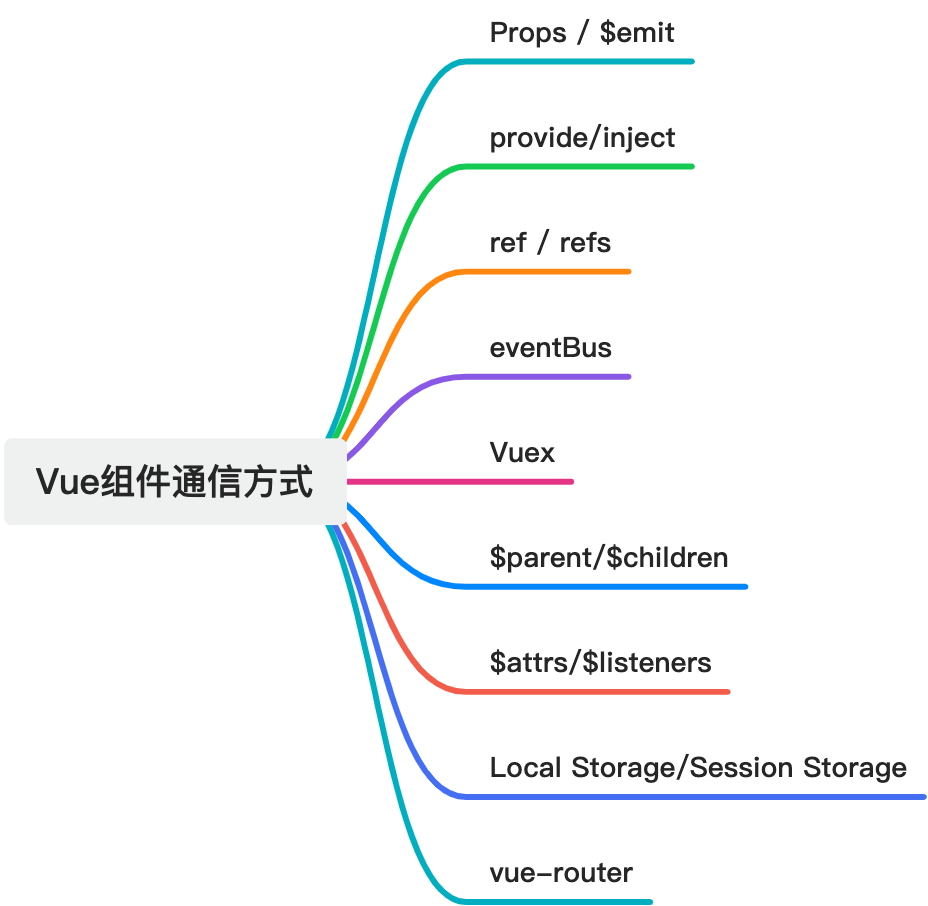
Using
Using
Vue Component Communication Patterns
props / $emit
props are used for parent-to-child communication.$emit is used for child-to-parent communication.
Parent component:
vue
<template>
  <ChildComponent :message="parentMessage" @customEvent="handleCustomEvent" />
</template>

<script>
import ChildComponent from "./ChildComponent.vue";

export default {
  components: {
    ChildComponent,
  },
  data() {
    return {
      parentMessage: "Hello from parent!",
    };
  },
  methods: {
    handleCustomEvent(payload) {
      console.log("Received from child:", payload);
    },
  },
};
</script>
Child component:
vue
<template>
  <div>
    <div>
      {{ message }}
    </div>
    <button @click="sendDataToParent">Send Data</button>
  </div>
</template>

<script>
export default {
  props: ["message"],
  methods: {
    sendDataToParent() {
      this.$emit("customEvent", "Data sent from child");
    },
  },
};
</script>
This is one of the most common and recommended communication patterns in Vue.
provide / inject
When an ancestor component needs to pass data to deep descendants, provide and inject can be useful. Unlike normal parent-child communication, they let an ancestor expose data that descendants can consume directly.
Good fit
- sharing themes, locales, or app-wide config
- exposing values deep in a component tree without passing props through every intermediate layer
Ancestor component:
vue
<template>
  <div>
    <ChildComponent />
  </div>
</template>

<script>
import ChildComponent from "./ChildComponent.vue";

export default {
  components: {
    ChildComponent,
  },
  provide() {
    return {
      sharedMessage: "This message is shared!",
    };
  },
};
</script>
Descendant component:
vue
<template>
  <div>{{ sharedMessage }}</div>
</template>

<script>
export default {
  inject: ["sharedMessage"],
};
</script>
Notes
injectcreates a link from ancestor to descendant, but updates still flow downward.- Overusing
provide/injectcan increase coupling and make data flow harder to reason about.
ref / $refs
ref and $refs are used to get references to child components or DOM elements.
Good fit
- calling a child component method from the parent
- directly touching a child DOM element when necessary
Parent component:
vue
<template>
  <div>
    <ChildComponent ref="childComponentRef" />
    <button @click="callChildMethod">Call Child Method</button>
  </div>
</template>

<script>
import ChildComponent from "./ChildComponent.vue";

export default {
  components: {
    ChildComponent,
  },
  methods: {
    callChildMethod() {
      this.$refs.childComponentRef.childMethod();
    },
  },
};
</script>
Child component:
vue
<template>
  <div>Child Component</div>
</template>

<script>
export default {
  methods: {
    childMethod() {
      console.log("Child method called");
    },
  },
};
</script>
Notes
refand$refsshould be used carefully because they bypass normal reactive data flow.
EventBus
An EventBus is a simple event-bus pattern built around a shared Vue instance. It can work for lightweight non-parent-child communication.
Good fit
- communication between components that are not directly related
- small applications with limited cross-component messaging
Create the EventBus:
js
// EventBus.js
import Vue from "vue";
export const EventBus = new Vue();
Publish from a component:
vue
<template>
  <div>
    <button @click="sendMessage">Send Message</button>
  </div>
</template>

<script>
import { EventBus } from "./EventBus.js";

export default {
  methods: {
    sendMessage() {
      EventBus.$emit("messageSent", "Hello from EventBus!");
    },
  },
};
</script>
Listen in another component:
vue
<template>
  <div>
    <p>{{ receivedMessage }}</p>
  </div>
</template>

<script>
import { EventBus } from "./EventBus.js";

export default {
  data() {
    return {
      receivedMessage: "",
    };
  },
  created() {
    EventBus.$on("messageSent", (message) => {
      this.receivedMessage = message;
    });
  },
};
</script>
Notes
- EventBus is global and can become difficult to maintain if overused.
Vuex
Vuex is Vue's official centralized state-management solution.
Good fit
- multiple components need the same shared state
- application state logic becomes more complex
- centralized control over mutations and asynchronous workflows is needed
Create a Vuex store:
js
// store.js
import Vue from "vue";
import Vuex from "vuex";

Vue.use(Vuex);

export default new Vuex.Store({
  state: {
    message: "Hello from Vuex!",
  },
  mutations: {
    updateMessage(state, newMessage) {
      state.message = newMessage;
    },
  },
  getters: {
    getMessage: (state) => state.message,
  },
});
Use Vuex in a component:
vue
<template>
  <div>
    <p>Message from Vuex: {{ message }}</p>
  </div>
</template>

<script>
import { mapState } from "vuex";

export default {
  computed: {
    ...mapState(["message"]),
  },
};
</script>
Use Vuex in another component:
vue
<template>
  <div>
    <p>Message from Vuex in another component: {{ message }}</p>
    <button @click="updateMessage">Update Message</button>
  </div>
</template>

<script>
import { mapState, mapMutations } from "vuex";

export default {
  computed: {
    ...mapState(["message"]),
  },
  methods: {
    ...mapMutations(["updateMessage"]),
  },
};
</script>
$parent / $children
$parent and $children let a component access its direct parent or direct children.
Good fit
- very limited direct parent-child access cases
Parent component:
vue
<template>
  <div>
    <ChildComponent />
    {{ parentMessage }}
    <button @click="getChild">getChild</button>
  </div>
</template>

<script>
import ChildComponent from "./ChildComponent.vue";

export default {
  components: {
    ChildComponent,
  },
  data() {
    return {
      parentMessage: "Hello from parent!",
    };
  },
  methods: {
    getChild() {
      console.log(this.$children[0]);
    },
  },
};
</script>
Child component:
vue
<template>
  <div>
    <button @click="setParent">setParent</button>
  </div>
</template>

<script>
export default {
  name: "ChildComponent",
  methods: {
    setParent() {
      this.$parent.parentMessage = "Hello from ChildComponent!";
    },
  },
};
</script>
Notes
- this creates strong coupling
- it only works for direct parent-child relationships
- Vue 3 no longer supports
$childrenin the same way;refsare preferred instead
$attrs / $listeners
$attrs and $listeners are used for forwarding attributes and listeners through wrapper components.
Good fit
- higher-order components
- pass-through wrapper components
Parent component:
vue
<template>
  <ChildComponent v-bind="$attrs" v-on="$listeners" />
</template>

<script>
import ChildComponent from "./ChildComponent.vue";

export default {
  components: {
    ChildComponent,
  },
};
</script>
Child component:
vue
<template>
  <div>
    {{ propFromParent }}
    <button @click="$emit('custom-event')">Trigger Custom Event</button>
  </div>
</template>

<script>
export default {
  props: {
    propFromParent: String,
  },
};
</script>
localStorage / sessionStorage
These browser storage mechanisms can also be used as a lightweight way to share data across Vue components, because multiple component instances can read from the same storage area.
Using localStorage
Component A:
js
localStorage.setItem("name", "John");
const name = localStorage.getItem("name");
Component B:
js
const name = localStorage.getItem("name");Using sessionStorage
Component A:
js
sessionStorage.setItem("age", 20);Component B:
js
const age = sessionStorage.getItem("age");localStorage persists longer. sessionStorage only lives for the current session.
Notes
- data changes are not automatically reactive
- storage space is limited
- this is only suitable for lightweight, non-core state sharing
vue-router
Strictly speaking, route params are not classic component-to-component communication. They pass data between routed views through navigation state. Still, in practice, they can act as an indirect communication method.
Component A:
js
this.$router.push({
  name: "user",
  params: {
    userId: 1234,
  },
});
Component B (user view):
js
const userId = this.$route.params.userId;Notes
- this introduces routing-level coupling
- it is more of a navigation-based data handoff than a pure communication pattern