Skip to content
React Component Communication Patterns
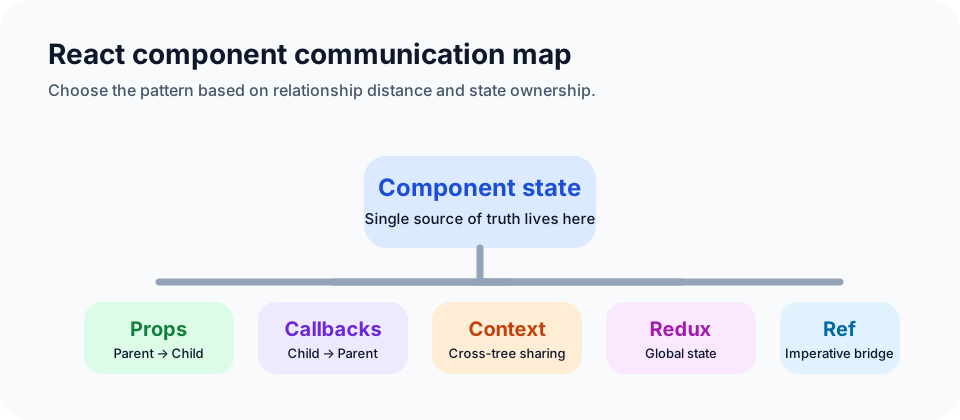
Props
Props are the most direct mechanism for passing data from a parent component to a child component.
jsx
// Parent.js
import React from 'react';
import Child from './Child';

function Parent() {
  const message = 'Hello from Parent!';
  return <Child message={message} />;
}

// Child.js
import React from 'react';

function Child(props) {
  return <div>{props.message}</div>;
}
In this example, Parent passes message to Child, and Child renders it.
Callback functions
By passing a callback down through props, a child component can send data back to its parent.
jsx
// Parent.js
import React, { useState } from 'react';
import Child from './Child';

function Parent() {
  const [data, setData] = useState('');

  const handleChildData = (dataFromChild) => {
    setData(dataFromChild);
  };

  return (
    <div>
      <Child onData={handleChildData} />
      <p>Data from Child: {data}</p>
    </div>
  );
}

// Child.js
import React from 'react';

function Child(props) {
  const sendDataToParent = () => {
    props.onData('Data from Child!');
  };

  return <button onClick={sendDataToParent}>Send Data</button>;
}
This is the standard child-to-parent pattern in React.
Ref
Refs are primarily meant for accessing DOM nodes, but they can also be used for direct component communication when necessary.
jsx
// Parent.js
import React, { useRef } from 'react';
import Child from './Child';

function Parent() {
  const childRef = useRef(null);

  const sendDataToChild = () => {
    childRef.current.displayMessage('Data from Parent!');
  };

  return (
    <div>
      <button onClick={sendDataToChild}>Send Data to Child</button>
      <Child ref={childRef} />
    </div>
  );
}

// Child.js
import React, { forwardRef, useImperativeHandle } from 'react';

const Child = forwardRef((props, ref) => {
  const [message, setMessage] = React.useState('');

  const displayMessage = (data) => {
    setMessage(data);
  };

  useImperativeHandle(ref, () => ({
    displayMessage,
  }));

  return <div>Message from Parent: {message}</div>;
});
This pattern is powerful, but it should be used carefully because it bypasses React's normal one-way data flow.
Context
Context is used to pass data across multiple component levels without drilling props manually through every layer.
jsx
// MyContext.js
import React from 'react';

const MyContext = React.createContext();
export default MyContext;

// Parent.js
import React, { useState } from 'react';
import Child from './Child';
import MyContext from './MyContext';

function Parent() {
  const [message, setMessage] = useState('');

  const handleChildData = (dataFromChild) => {
    setMessage(dataFromChild);
  };

  return (
    <MyContext.Provider value={message}>
      <Child onData={handleChildData} />
      <p>Data from Child: {message}</p>
    </MyContext.Provider>
  );
}

// Child.js
import React, { useContext } from 'react';
import MyContext from './MyContext';

function Child(props) {
  const message = useContext(MyContext);

  const sendDataToParent = () => {
    props.onData('Data from Child!');
  };

  return (
    <div>
      <button onClick={sendDataToParent}>Send Data</button>
      <p>Data from Parent: {message}</p>
    </div>
  );
}
Context is a good fit for shared state such as theme, auth, or locale, but it should not become a default replacement for all props.
Redux
Redux is a centralized state management solution. It keeps application state in a global store and updates that state through predictable actions and reducers.
jsx
// actions.js
export const addTodo = (text) => ({
  type: 'ADD_TODO',
  payload: { text },
});

// reducers.js
const initialState = {
  todos: [],
};

const todoReducer = (state = initialState, action) => {
  switch (action.type) {
    case 'ADD_TODO':
      return {
        ...state,
        todos: [...state.todos, action.payload.text],
      };
    default:
      return state;
  }
};

export default todoReducer;
Redux is useful when state becomes shared, global, and structurally complex. It adds ceremony, so it is usually not the first thing to reach for in small component trees.
Publish-subscribe
You can also use a Pub/Sub pattern for loose coupling between components.
jsx
// Publisher.js
import React from 'react';
import pubsub from 'pubsub-js';

function Publisher() {
  const publishMessage = () => {
    pubsub.publish('customEvent', 'Hello from Publisher!');
  };

  return (
    <div>
      <button onClick={publishMessage}>Publish Message</button>
    </div>
  );
}

// Subscriber.js
import React, { useState, useEffect } from 'react';
import pubsub from 'pubsub-js';

function Subscriber() {
  const [message, setMessage] = useState('');

  useEffect(() => {
    const token = pubsub.subscribe('customEvent', (msg, data) => {
      setMessage(data);
    });

    return () => {
      pubsub.unsubscribe(token);
    };
  }, []);

  return <p>Received Message: {message}</p>;
}
This pattern decouples sender and receiver, but subscription lifecycle needs to be managed carefully.
Global events
Native browser events can also be used as an event bus.
jsx
function SenderComponent() {
  const sendData = () => {
    const customEvent = new CustomEvent('customEvent', { detail: 'Hello' });
    window.dispatchEvent(customEvent);
  };

  return <button onClick={sendData}>Send Data</button>;
}
jsx
function ReceiverComponent() {
  const [receivedData, setReceivedData] = React.useState('');

  React.useEffect(() => {
    const handleCustomEvent = (event) => {
      setReceivedData(event.detail);
    };

    window.addEventListener('customEvent', handleCustomEvent);

    return () => {
      window.removeEventListener('customEvent', handleCustomEvent);
    };
  }, []);

  return <div>Received Data: {receivedData}</div>;
}
This works, but it is easy to overuse and can make the codebase harder to reason about.
Summary
Each pattern has a different trade-off:
- Props
- Pros: direct, explicit, easy for parent-child communication
- Cons: awkward through many layers
- Callback functions
- Pros: standard child-to-parent communication
- Cons: can become repetitive across many layers
- Ref
- Pros: direct imperative access
- Cons: breaks encapsulation if overused
- Context
- Pros: good for shared cross-tree data
- Cons: less explicit than props
- Redux
- Pros: centralized state management
- Cons: more setup and complexity
- Publish-subscribe
- Pros: loose coupling
- Cons: harder lifecycle and event management
- Global events
- Pros: flexible
- Cons: easy to abuse
For simple parent-child flows, props and callbacks are usually enough. For wider state sharing, Context or Redux tends to be a better fit.