Skip to content
Scaffolding in the Frontend Engineering Workflow
Hi, I'm Terence. Today let's talk about scaffolding in frontend engineering.
Introduction
Project setup has a direct impact on delivery speed and code consistency. A strong scaffolding tool can initialize project structure, generate config, enforce conventions, and help teams start with a coherent baseline instead of rebuilding the same setup from scratch every time.
Most developers use scaffolding all the time, but many only see the command they run and not the broader system behind it. This article takes a wider look.
What is scaffolding?
In construction, scaffolding is a temporary structure that supports building work. In frontend engineering, a scaffolding tool plays a similar role: it helps teams initialize projects quickly, generate required files and folders, and provision an initial development environment.
Scaffolding has become standard because it removes repetitive setup work and lets developers move to product logic earlier.
A short history
Frontend build systems evolved in waves, and scaffolding tools evolved with them.
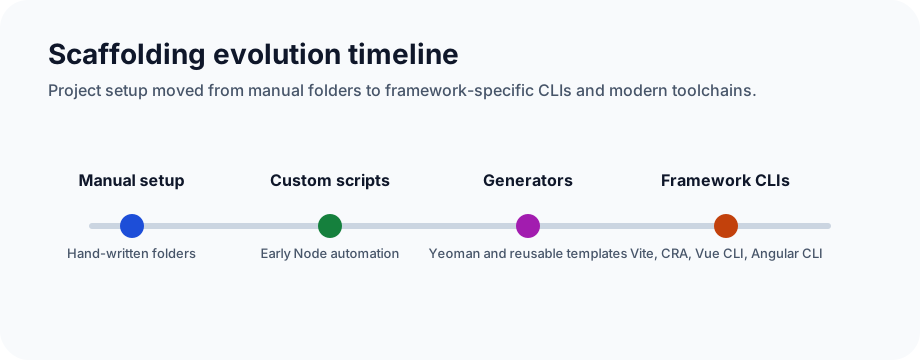
- Early web projects: teams created folders and configuration by hand. Every project looked different, which hurt consistency.
- Primitive scripts: in the early Node tooling era, developers wrote custom initialization scripts, but the ecosystem was not mature enough for strong reuse.
- Dedicated scaffolding tools: tools like Yeoman introduced generators that could create structure and automate setup.
- Framework-specific CLIs: tools such as Create React App, Vue CLI, and Angular CLI packaged opinions, defaults, and best practices into a smoother starting point.
How scaffolding works
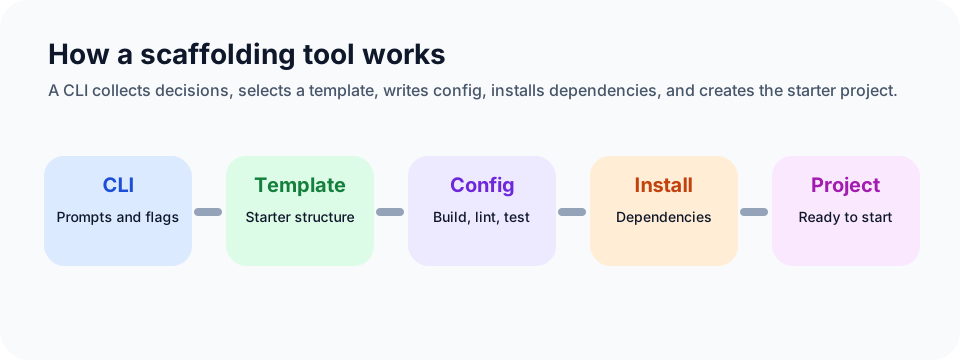
At a high level, most scaffolding tools combine the following parts:
- Template system: predefined file trees and starter code that encode baseline practices.
- CLI interaction: commands and prompts that collect project decisions from the developer.
- Dependency installation: automatic installation of the packages required by the chosen template.
- Config generation: writing config for bundlers, compilers, linters, and testing tools.
- Code generation: creating components, modules, routes, or feature slices later in the lifecycle.
- Plugin and extension support: allowing teams to augment or override default behavior.
Problems scaffolding solves
- Slow project initialization: scaffolding compresses hours of setup into minutes.
- Inconsistent project structure: templates create predictable structure and naming.
- Complex configuration: tooling config can be generated instead of hand-written every time.
- Unclear tech choices: scaffolds often encode recommended defaults and opinionated best practices.
In practice, scaffolding also tends to bundle support for:
- JavaScript transpilation
- asset processing
- versioning support
- local dev servers
- testing hooks
- linting
- dependency injection patterns in some ecosystems
- browser compatibility helpers such as vendor prefixing
Common frontend scaffolding tools
- Create React App: once the standard React entry point, optimized for fast project bootstrapping.
- Vue CLI: the official Vue scaffolding tool with plugin support.
- Angular CLI: an end-to-end CLI for generating, building, testing, and maintaining Angular projects.
- Yeoman: a general-purpose generator ecosystem.
- Vite: a modern toolchain that is now the default starting point for many frontend projects.
- Custom internal scaffolds: common in teams that need repeatable architecture and internal conventions.
How to use a scaffolding tool well
Most scaffolding guides boil down to three concerns:
- Basic workflow: install the tool, choose a template, initialize the project.
- Command surface: learn the create, dev, build, and generate commands that matter.
- Customization: understand which parts can be changed safely when project requirements differ from defaults.
Advantages
- faster development startup
- more consistent project structure
- encoded best practices
- lower onboarding cost for new contributors
Potential downsides
Over-reliance
If developers only know how to run the scaffold command and never learn what it generated, they can struggle when non-standard requirements appear.
Weak understanding of internals
Generated config can feel opaque. Teams should still understand the build system, lint rules, test strategy, and deployment assumptions underneath.
Balancing convenience and fundamentals
The right approach is not to reject scaffolding, but to pair it with learning. Official docs, source code, and real project debugging all help close that gap.
If you want to move toward expert-level engineering, there will eventually be situations where you need to design or extend your own scaffold, especially in larger organizations.
Future direction
Three trends are already visible:
- deeper integration with other tools, especially CI, testing, and release workflows
- more intelligent setup decisions, including AI-assisted recommendations
- broader platform coverage, not just web, but also desktop and mobile targets
Closing
Scaffolding is one of the most practical multipliers in frontend engineering. It improves speed, consistency, and onboarding, but it should not become a substitute for understanding how your stack actually works.
Used well, it gives you leverage. Used blindly, it can hide the exact layer you need to debug later.